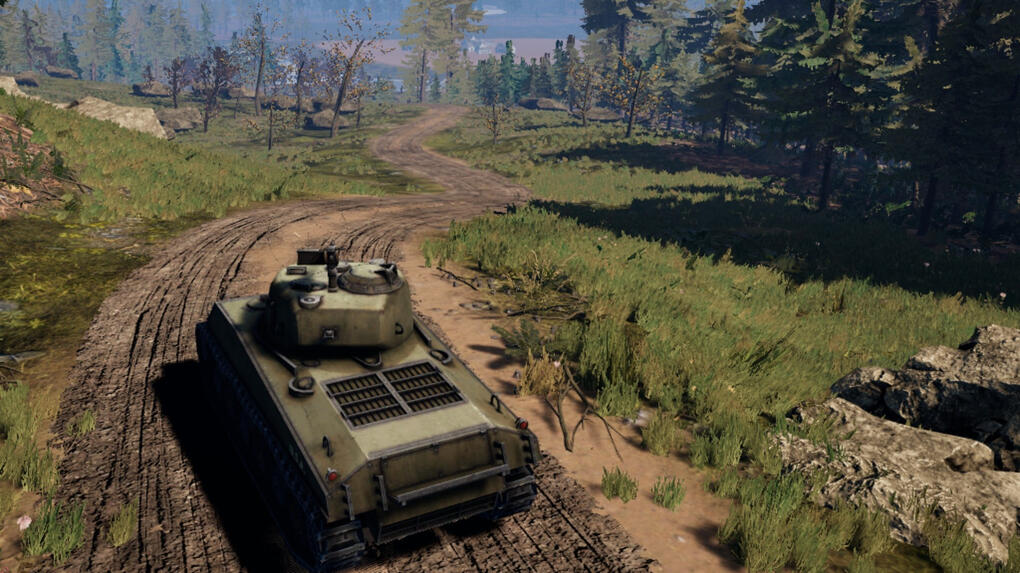
Tank Commander
Tank Commander
About
Tank Commander is an Unreal Engine 5 vehicle combat game. As the Systems & Tools Programmer, I engineered the core data architecture, built the dynamic vehicle customization systems, and developed C++ utilities to optimize performance during heavy Chaos destruction events.
Project Info
- Role: Systems & Tools Programmer
- Team Size: 4
- Engine: Unreal Engine 5.7
Acerca de
Tank Commander es un juego de combate de vehículos desarrollado con Unreal Engine 5. Como programador de sistemas y herramientas, diseñé la arquitectura de datos principal, construí los sistemas dinámicos de personalización de vehículos y desarrollé utilidades en C++ para optimizar el rendimiento durante eventos de destrucción masiva de Chaos.
Información
- Rol: Programador de Sistemas y Herramientas
- Equipo: 4
- Motor: Unreal Engine 5.7
Introduction
My main focus for this project was creating the data-driven customization system that allows designers to easily swap out tank parts, as well as optimizing the game's performance when dealing with heavy Chaos destruction.
I worked closely with the design team to ensure that the systems I built were modular, easy to extend, and didn't require any blueprint logic changes when adding new content.
Modular Customization System (The Hangar)
The system is built on a simple idea: Gameplay Tags are the universal key for everything.
Every customization slot on a vehicle (turret, barrel, hull front, etc.) has a Gameplay Tag. Every attachable part also has a Gameplay Tag. When a player picks a part in the hangar UI, the system writes a {SlotTag → PartTag} mapping into a persistent struct on the GameInstance. When they deploy to gameplay, the tank reads that struct and spawns the correct meshes into the correct sockets.
Because everything is driven by tag lookups and data assets, you can add new parts or even new slots without touching blueprint logic. You just need to create data assets and register them.
Hangar Interface & Preview
To provide a seamless customization experience, I built a dedicated Hangar GameMode. The player controls a BP_HangarPawn with custom orbit camera logic to smoothly rotate around the tank.
When navigating the UI, clicking a part in the WBP_PartSelectionPanel triggers a SwapSlotMesh function on the BP_HangarVehiclePreview actor. This provides instant 3D visual feedback without affecting the actual gameplay actor. Once the player confirms their loadout, the final configuration is written to the GameInstance.
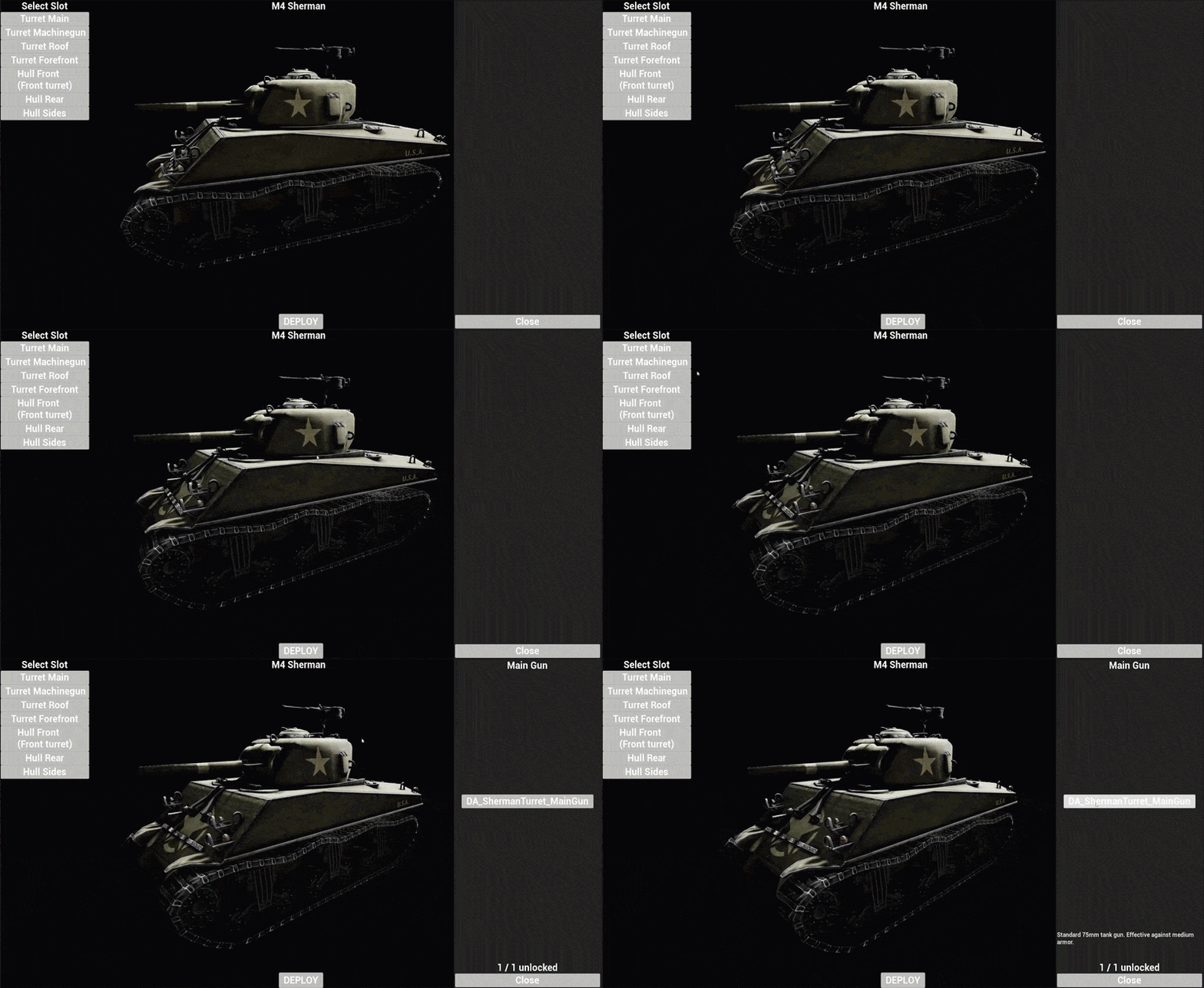
Hangar Customization Flow: Players interact with the real-time UI to preview how parts fit together before locking in their final loadout.
ShowForSlot: Populates the UI grid with available parts matching the currently selected slot's GameplayTag.
System Architecture
graph TD
    subgraph Data Layer
        Tags["DT_GameplayTags Slot.* & Part.*"]
        PDA["PDA_AttachableActor (per part)"]
        VDef["DA_VehicleDef_Sherman (per vehicle type)"]
        PDA -.->|"references"| Tags
        VDef -->|"AvailableParts[]"| PDA
        VDef -->|"DefaultLoadout[]"| DefaultSlots["SSlotAssignment[]"]
    end
    subgraph Core Persistent State
        GI["BP_GameInstance_Main"]
        GI -->|"holds"| Loadout["ActiveLoadout (SVehicleLoadout)"]
        GI -->|"tracks"| Unlocked["UnlockedParts (GameplayTagContainer)"]
    end
    subgraph Hangar Preview and UI
        GM_H["BP_HangarGameMode"] -->|"first-boot init"| GI
        Ctrl["BP_HangarController"] -->|"creates"| HUD["WBP_HangarHUD"]
        Ctrl -->|"possesses"| Pawn["BP_HangarPawn (orbit camera)"]
        HUD -->|"OpenSlotPanel()"| Panel["WBP_PartSelectionPanel"]
        Panel -->|"ShowForSlot()"| Items["WBP_PartListItem × N"]
        Items -->|"on click"| Preview["BP_HangarVehiclePreview (SwapSlotMesh)"]
        Items -->|"on click"| GI
    end
    subgraph Gameplay Spawning
        Sherman["BP_Sherman"] -->|"BeginPlay"| GI
        Sherman -->|"populates"| SocketMap["SocketsAndAttachables Map"]
        SocketMap -->|"Parent BeginPlay"| Spawner["BP_BaseTrackedVehicle (AttachModules)"]
    end
    VDef -.-> GI
System Architecture: Data assets define available parts, the GameInstance stores the persistent configuration, and the Hangar UI safely previews them.
Chaos Destruction & Performance
Unreal's Chaos Destruction engine provides incredible visuals, but generating thousands of physics-simulated debris pieces on ground contact severely impacted our framerate.
To solve this, I engineered a custom C++ component (GeometryCollectionDebrisComponent) that tracks fractured geometry. When debris hits the ground below a certain impulse threshold, the component disables its physics proxy, visually hides the meshes, and replaces them with highly performant Niagara particle bursts.
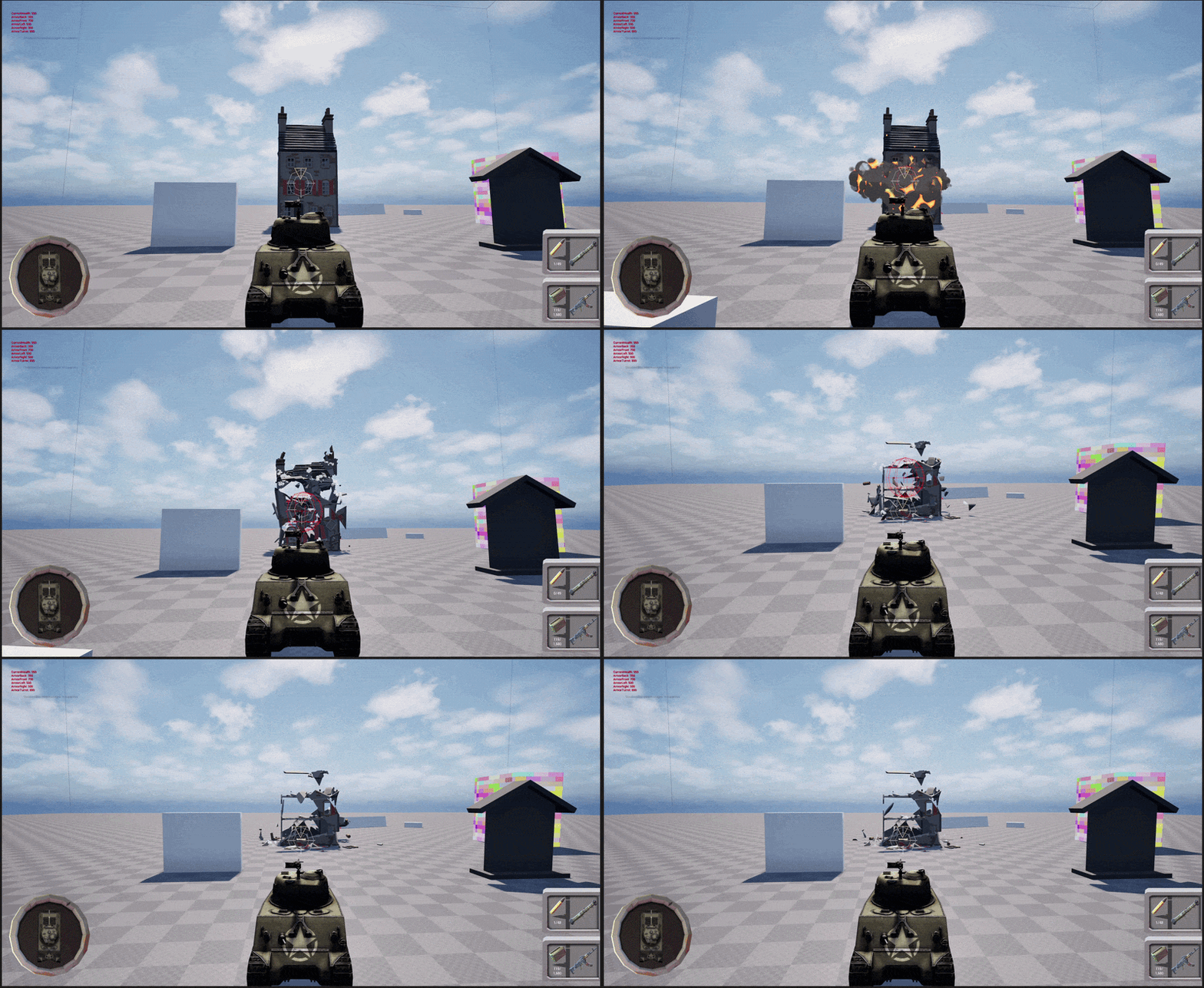
Chaos to Niagara Optimization: Massive geometry debris is silently swapped for performant Niagara bursts upon ground impact, saving massive physics calculation time.
void UGeometryCollectionDebrisComponent::OnGCHit(
	UPrimitiveComponent* HitComponent, AActor* OtherActor, UPrimitiveComponent* OtherComp,
	FVector NormalImpulse, const FHitResult& Hit)
{
	auto* HitGC = Cast<UGeometryCollectionComponent>(HitComponent);
	if (!HitGC || !RegisteredGCComponents.Contains(HitGC)) return;

	if (NormalImpulse.SizeSquared() < ImpulseThreshold * ImpulseThreshold) return;

	// Disable physics for the piece and its descendants
	if (ValidIndices.Num() > 0 && Proxy) {
		Proxy->DisableParticles_External(MoveTemp(ValidIndices));
	}

	// Hide visually by scaling transforms to zero
	TSet<int32>& Pending = PendingHideByGC.FindOrAdd(HitGC);
	for (int32 Idx : AllIndices) Pending.Add(Idx);
	HidePiecesVisually(HitGC, Pending);

	// Spawn highly performant Niagara VFX in place of the geometry debris
	if (DebrisBurstSystem) {
		UNiagaraFunctionLibrary::SpawnSystemAtLocation(
			this, DebrisBurstSystem, Hit.ImpactPoint, NormalImpulse.GetSafeNormal().Rotation(),
			FVector(1.0f), true, true, ENCPoolMethod::AutoRelease
		);
	}
}
OnGCHit: Intercepts geometry debris impacts, disables their physics simulation, hides the meshes, and spawns performant Niagara particle bursts.
In-Game Developer Tools
Recognizing that rapid iteration is key to game design, I developed a suite of in-game tools to accelerate playtesting for the rest of the team. This included a custom Debug Pause Menu for hot-swapping graphic settings and keybinds, and a Cheat Console for testing physics and AI with infinite ammo and rapid-fire.
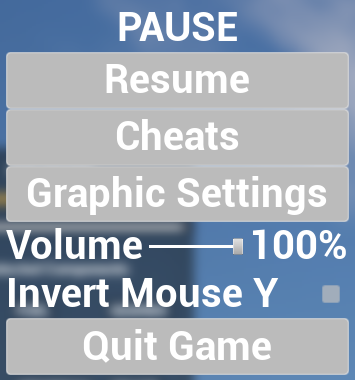
Debug Pause Menu: A custom-built toolset for developers and playtesters to swap graphical quality and configurations on the fly.
ChangeScalabilitySettings: Routes an EScalabilityOptions enum through a switch to apply specific rendering quality configurations based on UI combobox selections.
What I learned
In this project, I learned a lot about architecting data-driven systems that empower designers. Creating a system that relies entirely on Data Assets and Gameplay Tags showed me the importance of separating content from logic.
I also gained valuable experience optimizing C++ code for Chaos destruction. Profiling and finding the exact bottleneck allowed me to create a targeted solution that drastically improved performance while maintaining visual fidelity.
Introducción
Mi objetivo principal en este proyecto fue la creación del sistema de personalización basado en datos que permite a los diseñadores intercambiar piezas de tanques fácilmente, así como optimizar el rendimiento del juego al lidiar con una gran destrucción de Chaos.
Trabajé en estrecha colaboración con el equipo de diseño para asegurar que los sistemas que construí fueran modulares, fáciles de extender y no requirieran cambios en la lógica de Blueprints al añadir nuevo contenido.
Sistema de Personalización Modular (El Hangar)
El sistema se basa en una idea simple: Las Gameplay Tags son la clave universal para todo.
Cada ranura de personalización en un vehículo (torreta, cañón, frontal del casco, etc.) tiene una Gameplay Tag. Cada pieza acoplable también tiene una Gameplay Tag. Cuando un jugador elige una pieza en la interfaz de usuario del hangar, el sistema escribe un mapeo {SlotTag → PartTag} en una estructura persistente en el GameInstance. Cuando se despliegan al juego, el tanque lee esa estructura y genera las mallas correctas en los sockets adecuados.
Dado que todo se controla mediante búsquedas de tags y Data Assets, se pueden añadir nuevas piezas o incluso nuevas ranuras sin tocar la lógica de Blueprints, simplemente creando y registrando los Data Assets.
Interfaz y Previsualización del Hangar
Para proporcionar una experiencia de personalización fluida, construí un GameMode de Hangar dedicado. El jugador controla un BP_HangarPawn con lógica de cámara orbital personalizada para rotar suavemente alrededor del tanque.
Al navegar por la interfaz de usuario, hacer clic en una pieza en el WBP_PartSelectionPanel activa una función SwapSlotMesh en el actor BP_HangarVehiclePreview. Esto proporciona retroalimentación visual 3D instantánea sin afectar al actor de juego real. Una vez que el jugador confirma su equipamiento, la configuración final se escribe en el GameInstance.
Flujo de Personalización del Hangar: Los jugadores interactúan con la interfaz de usuario en tiempo real para visualizar cómo quedan las piezas antes de aplicar la configuración final.
ShowForSlot: Rellena la cuadrícula de la interfaz de usuario con las piezas disponibles que coinciden con la GameplayTag de la ranura actualmente seleccionada.
Arquitectura del Sistema
graph TD
    subgraph Data Layer
        Tags["DT_GameplayTags Slot.* & Part.*"]
        PDA["PDA_AttachableActor (per part)"]
        VDef["DA_VehicleDef_Sherman (per vehicle type)"]
        PDA -.->|"references"| Tags
        VDef -->|"AvailableParts[]"| PDA
        VDef -->|"DefaultLoadout[]"| DefaultSlots["SSlotAssignment[]"]
    end
    subgraph Core Persistent State
        GI["BP_GameInstance_Main"]
        GI -->|"holds"| Loadout["ActiveLoadout (SVehicleLoadout)"]
        GI -->|"tracks"| Unlocked["UnlockedParts (GameplayTagContainer)"]
    end
    subgraph Hangar Preview and UI
        GM_H["BP_HangarGameMode"] -->|"first-boot init"| GI
        Ctrl["BP_HangarController"] -->|"creates"| HUD["WBP_HangarHUD"]
        Ctrl -->|"OpenSlotPanel()"| Panel["WBP_PartSelectionPanel"]
        Ctrl -->|"possesses"| Pawn["BP_HangarPawn (orbit camera)"]
        HUD -->|"OpenSlotPanel()"| Panel["WBP_PartSelectionPanel"]
        Panel -->|"ShowForSlot()"| Items["WBP_PartListItem × N"]
        Items -->|"on click"| Preview["BP_HangarVehiclePreview (SwapSlotMesh)"]
        Items -->|"on click"| GI
    end
    subgraph Gameplay Spawning
        Sherman["BP_Sherman"] -->|"BeginPlay"| GI
        Sherman -->|"populates"| SocketMap["SocketsAndAttachables Map"]
        SocketMap -->|"Parent BeginPlay"| Spawner["BP_BaseTrackedVehicle (AttachModules)"]
    end
    VDef -.-> GI
Arquitectura del Sistema: Los Data Assets definen las piezas disponibles, el GameInstance almacena la configuración persistente, y la interfaz de usuario del Hangar las previsualiza de forma segura.
Destrucción de Chaos y Rendimiento
El motor de destrucción Chaos de Unreal ofrece efectos visuales increíbles, pero la generación de miles de piezas de escombros simuladas por física al contacto con el suelo afectó gravemente nuestra tasa de fotogramas.
Para resolver esto, diseñé un componente C++ personalizado (GeometryCollectionDebrisComponent) que rastrea la geometría fracturada. Cuando los escombros golpean el suelo por debajo de un cierto umbral de impulso, el componente deshabilita su proxy de física, oculta visualmente las mallas y las reemplaza con ráfagas de partículas de Niagara de alto rendimiento.
Optimización de Chaos a Niagara: Los escombros de geometría masivos se reemplazan silenciosamente por explosiones de partículas de Niagara al impactar contra el suelo, lo que ahorra un tiempo de cálculo de física masivo.
void UGeometryCollectionDebrisComponent::OnGCHit(
	UPrimitiveComponent* HitComponent, AActor* OtherActor, UPrimitiveComponent* OtherComp,
	FVector NormalImpulse, const FHitResult& Hit)
{
	auto* HitGC = Cast<UGeometryCollectionComponent>(HitComponent);
	if (!HitGC || !RegisteredGCComponents.Contains(HitGC)) return;

	if (NormalImpulse.SizeSquared() < ImpulseThreshold * ImpulseThreshold) return;

	// Disable physics for the piece and its descendants
	if (ValidIndices.Num() > 0 && Proxy) {
		Proxy->DisableParticles_External(MoveTemp(ValidIndices));
	}

	// Hide visually by scaling transforms to zero
	TSet<int32>& Pending = PendingHideByGC.FindOrAdd(HitGC);
	for (int32 Idx : AllIndices) Pending.Add(Idx);
	HidePiecesVisually(HitGC, Pending);

	// Spawn highly performant Niagara VFX in place of the geometry debris
	if (DebrisBurstSystem) {
		UNiagaraFunctionLibrary::SpawnSystemAtLocation(
			this, DebrisBurstSystem, Hit.ImpactPoint, NormalImpulse.GetSafeNormal().Rotation(),
			FVector(1.0f), true, true, ENCPoolMethod::AutoRelease
		);
	}
}
OnGCHit: Intercepta los impactos de escombros de geometría, deshabilita su simulación física, oculta las mallas y genera ráfagas de partículas de Niagara de alto rendimiento.
Herramientas de Desarrollo en el Juego
Reconociendo que la iteración rápida es clave en el diseño de videojuegos, desarrollé un conjunto de herramientas dentro del juego para acelerar las pruebas de juego para el resto del equipo. Esto incluyó un menú de pausa de depuración personalizado para cambiar rápidamente la configuración gráfica y las asignaciones de teclas, y una consola de trucos para probar la física y la IA con munición infinita y disparo rápido.
Menú de Pausa de Depuración: Un conjunto de herramientas diseñado a medida para que los desarrolladores y probadores intercambien la calidad gráfica y las configuraciones sobre la marcha.
ChangeScalabilitySettings: Dirige un enumerador EScalabilityOptions a través de un switch para aplicar configuraciones específicas de calidad de renderizado basadas en las selecciones de un combobox de la interfaz de usuario.
Lo que aprendí
En este proyecto, aprendí mucho sobre la arquitectura de sistemas basados en datos que empoderan a los diseñadores. La creación de un sistema que depende completamente de Data Assets y Gameplay Tags me mostró la importancia de separar el contenido de la lógica.
También adquirí una valiosa experiencia optimizando código C++ para la destrucción de Chaos. La perfilación y la identificación del cuello de botella exacto me permitieron crear una solución dirigida que mejoró drásticamente el rendimiento manteniendo la fidelidad visual.