BLACKSHARD Optimized Tweaks
BLACKSHARD Optimized Tweaks
About
BLACKSHARD Optimized Tweaks is a performance optimization mod I created for the Unreal Engine 5.6 game 'BLACKSHARD'. By stripping away some of the engine's heaviest rendering features like Nanite and Virtual Shadow Maps, the mod effectively doubles framerates (e.g., from 65 FPS to 135 FPS) without significantly degrading the visual experience.
Project Info
- Role: Modder / Optimizer
- Team Size: 1
- Engine: Unreal Engine 5.6
Acerca de
BLACKSHARD Optimized Tweaks es un mod de optimización de rendimiento que creé para el juego 'BLACKSHARD', desarrollado con Unreal Engine 5.6. Al eliminar algunas de las características de renderizado más pesadas del motor, como Nanite y Virtual Shadow Maps, el mod duplica eficazmente los fotogramas por segundo (por ejemplo, de 65 FPS a 135 FPS) sin degradar significativamente la experiencia visual.
Información
- Rol: Modder / Optimizador
- Equipo: 1
- Motor: Unreal Engine 5.6
Download the mod on Nexus Mods!
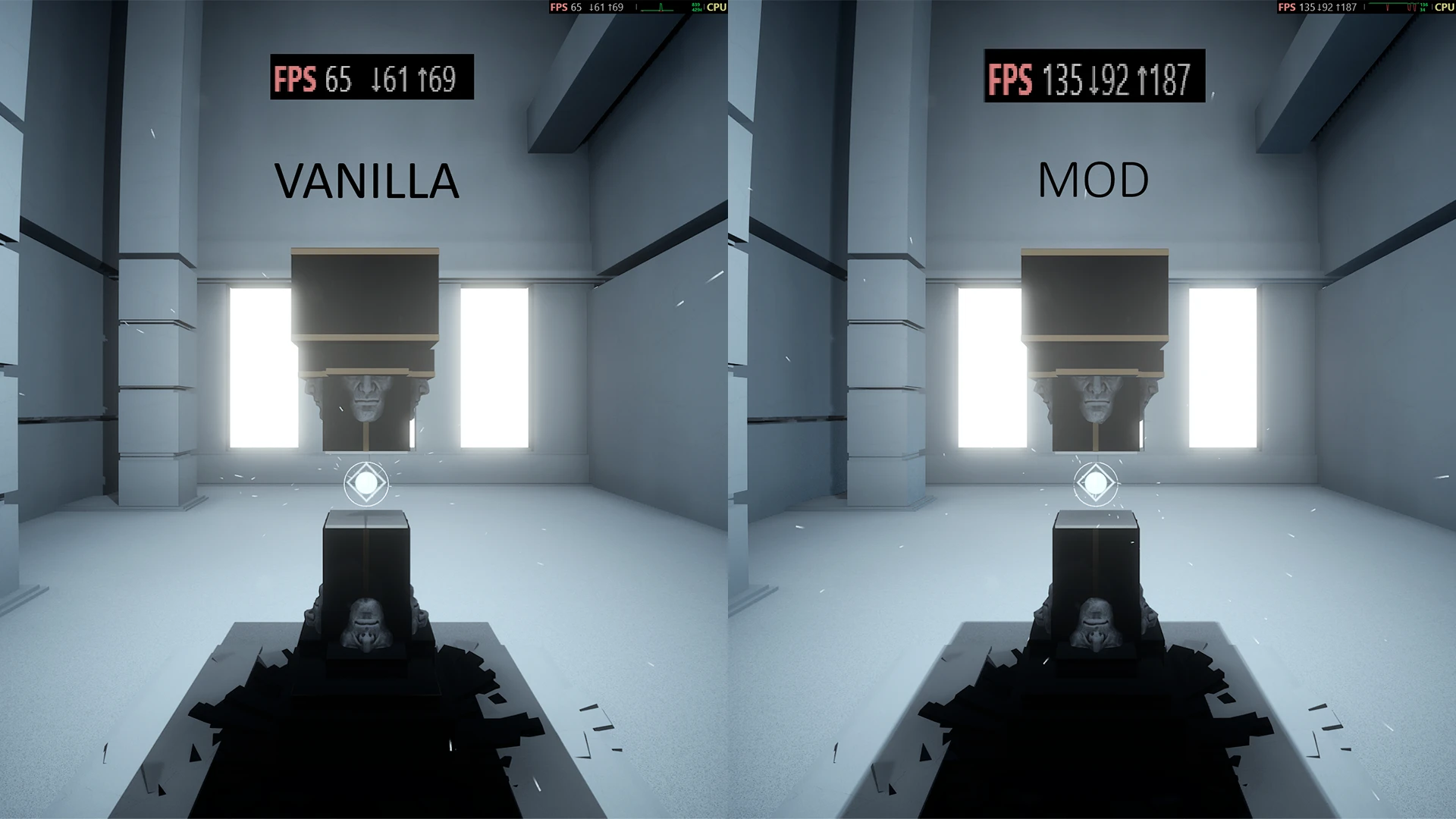
Performance comparison: The vanilla game runs at 65 FPS, while the modded version jumps to 135 FPS in the same scene.
Introduction
BLACKSHARD was struggling under UE5's heavier rendering features and rather sloppy optimization. After testing dozens of console commands and config tweaks, I found the most effective fix was simply disabling the heaviest hitters outright, resulting in a >2x framerate increase.
The Engine.ini Tweaks
The mod consists of a few configuration overrides in the game's Engine.ini file.
[/Script/Engine.RendererSettings]
r.Shadow.Virtual.Enable=0
r.AntiAliasingMethod=2
r.Nanite=0
Engine Config: Bypasses heavy rendering features by injecting CVar overrides directly into the engine's initialization pipeline.
By disabling Nanite and Virtual Shadow Maps (VSM), the GPU overhead plummets, resulting in a massive >2x performance increase with surprisingly little loss to the game's overall aesthetic.
Aliasing Options
Because disabling Temporal Super Resolution (TSR) can drastically change how the game handles jagged edges, I packaged the mod into three different flavors to suit different player preferences:
- TAA (Temporal Anti-Aliasing): The standard option (shown in the
.inisnippet above withr.AntiAliasingMethod=2). Provides smooth edges at a much lower performance cost than TSR. - FXAA: An even lighter, fast-approximate pass for older hardware.
- No AA: For purists who prefer maximum sharpness and zero blurring, at the cost of aliasing.
What I Learned
This was a good reminder that optimization isn't always about writing clever code. Profiling the game showed that Nanite and Virtual Shadow Maps were responsible for the vast majority of the GPU load, and simply toggling them off gave better results than any amount of fine-tuning. Knowing when to cut a feature rather than optimize it is just as important.
¡Descarga el mod en Nexus Mods!
Comparación de rendimiento: El juego vanilla funciona a 65 FPS, mientras que la versión modificada salta a 135 FPS en la misma escena.
Introducción
BLACKSHARD estaba sufriendo bajo las características de renderizado más pesadas de UE5 y una optimización bastante negligente. Después de probar decenas de comandos de consola y ajustes de configuración, descubrí que la solución más efectiva era la más simple: deshabilitar directamente los elementos más exigentes para un aumento de framerate de >2x.
Los ajustes de Engine.ini
El mod consiste en algunas anulaciones de configuración en el archivo Engine.ini del juego.
[/Script/Engine.RendererSettings]
r.Shadow.Virtual.Enable=0
r.AntiAliasingMethod=2
r.Nanite=0
Configuración del Motor: Evita características de renderizado pesadas inyectando anulaciones de CVar directamente en la pipeline de inicialización del motor.
Al deshabilitar Nanite y Virtual Shadow Maps (VSM), la sobrecarga de la GPU se desploma, lo que resulta en un enorme aumento de rendimiento de >2x con una pérdida sorprendentemente pequeña en la estética general del juego.
Opciones de Anti-Aliasing
Dado que deshabilitar Temporal Super Resolution (TSR) puede cambiar drásticamente cómo el juego maneja los bordes irregulares, empaqueté el mod en tres variantes diferentes para adaptarse a las preferencias de los distintos jugadores:
- TAA (Temporal Anti-Aliasing): La opción estándar (mostrada en el fragmento
.inide arriba conr.AntiAliasingMethod=2). Proporciona bordes suaves con un coste de rendimiento mucho menor que TSR. - FXAA: Una pasada aún más ligera y de aproximación rápida para hardware antiguo.
- Sin AA: Para puristas que prefieren la máxima nitidez y cero desenfoque, a costa del aliasing.
Lo que aprendí
Esto fue un buen recordatorio de que la optimización no siempre se trata de escribir código inteligente. La creación de perfiles del juego mostró que Nanite y Virtual Shadow Maps eran responsables de la mayor parte de la carga de la GPU, y simplemente desactivarlos dio mejores resultados que cualquier cantidad de ajuste fino. Saber cuándo eliminar una característica en lugar de optimizarla es igual de importante.